Legacy Attachments でできていたことを気軽に行えなくなった。
今回は省くが color の設定も good / warning / danger で設定するとうまく行かなくなったりする。
そんな Block Kit の備忘録としてメモを書いておく。
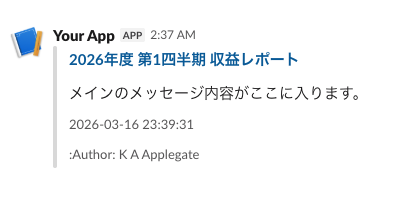
footer・title・title_link を Block Kit で表現してみる
- footer は context (複数設定できるようになった)
- title・title_link はセクションを分けてもいいし、本文と同じセクションに設定してもよい
- 若干テキスト同士の間隔が広くなった気がするが妥協する
{
    "attachments": [
        {
            "blocks": [
                {
                    "type": "section",
                    "text": {
                        "type": "mrkdwn",
                        "text": "*<https://example.com/reports/9876543210|2026年度 第1四半期 収益レポート>*"
                    }
                },
                {
                    "type": "section",
                    "text": {
                        "type": "mrkdwn",
                        "text": "メインのメッセージ内容がここに入ります。"
                    }
                },
                {
                    "type": "context",
                    "elements": [
                        {
                            "type": "mrkdwn",
                            "text": "2026-03-16 23:39:31"
                        }
                    ]
                },
                {
                    "type": "context",
                    "elements": [
                        {
                            "type": "plain_text",
                            "text": ":slack: Author: K A Applegate",
                            "emoji": true
                        }
                    ]
                }
            ]
        }
    ]
}
余談
太字・コードブロック・リンク付きにするには以下のようにする

"*`<https://example.com/reports/9876543210|2026年度 第1四半期 収益レポート>`*"
